
Customers already ask ChatGPT, Claude, Grok, and other AI apps for recommendations. "Who has a facial open Saturday?" "Can I rent a bike near the park this weekend?" "Is there a pottery class next week?"
Until now, those answers usually meant a hop back to your site, a hunt through pages, and a hope that the slot was still free.
AI-ready bookings, built right into your store. Your customers ask their favorite AI app what's available, and your booking link is the answer. No API keys, no developers, no add-on fees. Just switch it on, and let AI apps send customers your way.
That's AI Bookings in BookThatApp: one theme extension, available on all plans from day one. You keep the checkout, the order, and the customer.
Customers book where they already ask questions
People are shopping with AI the way they used to shop with Google. They describe what they want, ask what's open, and expect a clear next step.
With AI Bookings turned on, that next step can be your store:
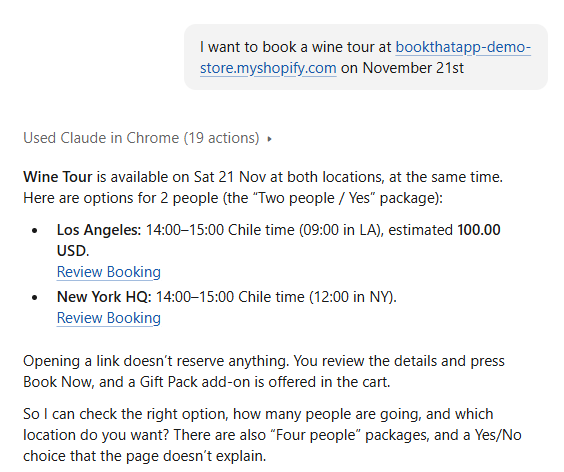
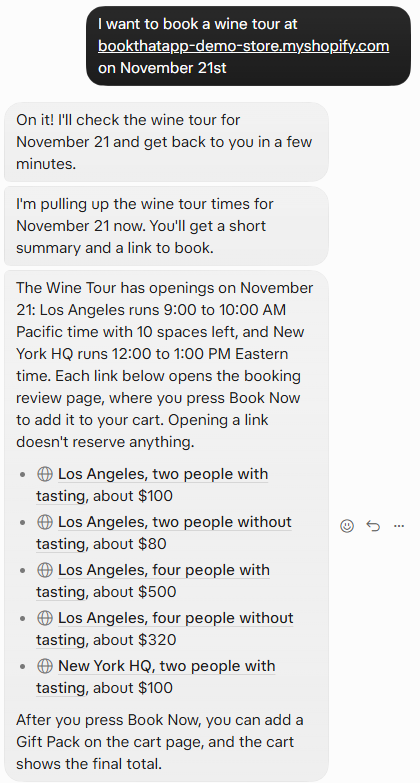
- Someone asks their favorite AI app about a service, class or rental at your business.
- The assistant finds your bookable products and reads live availability.
- It returns a booking link so they can start the booking in one click. If a booking link can't be built, they still get your product page, so nothing dead-ends.
We've tested it across a wide range of popular AI apps, so it works wherever your customers like to ask. We built it to work with AI agents in general, because that landscape keeps changing. Your customers stay in the apps they like. The booking still finishes on your Shopify store.
Turn it on. That's the setup.
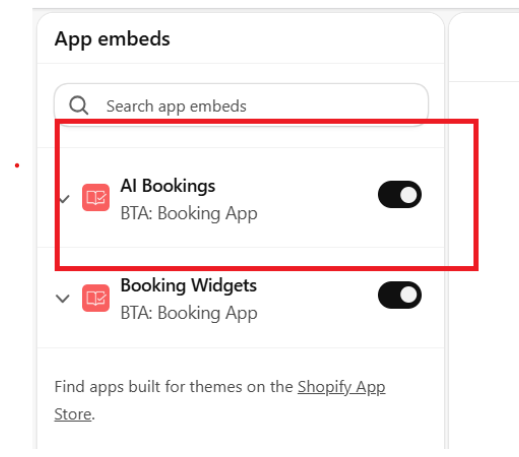
Merchants enable the AI Bookings theme app embed in their published Shopify theme. The dashboard shows whether it's on. Optional settings live under Settings-> AI Bookings in the app. That's it.
Other booking apps may offer AI booking through a developer API. Easy Appointment Booking (Servicify), for example, markets a Bookings API so an assistant can check slots and create bookings, sold as a paid add-on with API keys and agent setup. Useful if you have engineers. Not the same as flipping on a theme extension and going.
With AI Bookings, your current and potential customers can detect your bookable products and see availability without hunting through your site by hand.
Choose what AI can see
You're in control of which products show up.
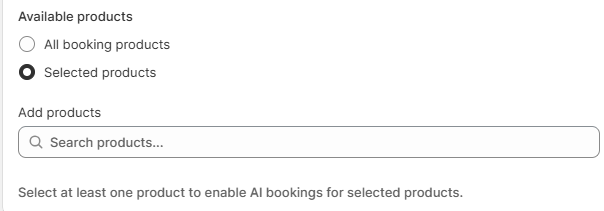
In AI Bookings settings you can:
- All booking products — every configured booking product, including ones you add later
- Selected products — pick exactly which bookable products AI apps can find
No complicated rules. Just a simple choice about what you're happy for assistants to discover.
Why this matters for your store
Every unanswered "is Saturday free?" is a booking that might never arrive. AI Bookings puts your availability in the conversation where the question already lives.
That means:
- More ways in. Customers who never open your homepage can still find a slot.
- Less hunting. No scrolling empty months or guessing which product page holds the calendar.
- Your brand stays in charge. The AI hands them a link. Payment and confirmation still happen on your store, with BookThatApp.
And because it's available on every plan, you don't need an Enterprise subscription to get started.
Getting set up (and help along the way)
- Open your Shopify theme editor and enable the AI Bookings theme app embed (separate from the BookThatApp widgets embed).
- Optionally, open Settings-> AI Bookings and choose all booking products or a selected list.
- Ask an AI app about one of your services and see the availability come back.
Our help article will walk through the details once it's live. And you're not on your own. Our Customer Success team is happy to help you get AI Bookings running. Book a free 15-minute call with our team.
FAQ
Do I need to write any code?
No. Enable the AI Bookings theme app embed. Settings are optional.
Which AI apps work?
We've tested it across a wide range of popular AI apps, so it works wherever your customers like to ask. As customers move between apps, your bookable products can still be discovered.
Does the AI take payment?
No. The assistant checks availability and returns a link. The customer finishes the booking and pays in your Shopify store.
Can I limit which products AI can see?
Yes. Choose All booking products or Selected products and pick the ones you want.
Which plans include AI Bookings?
AI Bookings are available on all plans.
Is this the same as Shopify's own AI shopping features?
No. Shopify's agentic storefront tools are about selling products in AI chats. AI Bookings is about letting assistants read your booking availability and start a BookThatApp booking.
Get started
Ready for customers to find your next open slot from ChatGPT, Claude, Grok, and other AI apps? Enable the AI Bookings theme extension in BookThatApp, or book a free 15-minute call and we'll help you turn it on.